Every time you open a website, stream a video, save a file online, or use an internet banking app, computers somewhere in the world help make that activity possible. Many of these computers operate inside specialized facilities called data centers.
Understanding what data centers are helps explain how modern digital services store information, process requests, and remain available to users. These facilities support everything from business websites and online shopping to cloud platforms, artificial intelligence, and communication services.
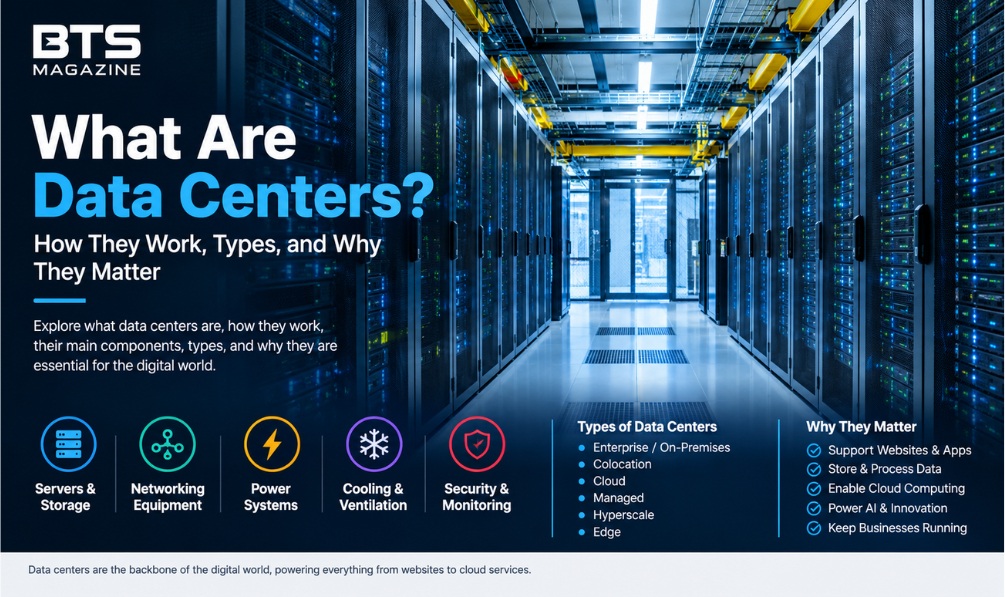
A data center is more than a room filled with computers. It combines servers, storage systems, networking equipment, electricity, cooling, security, and monitoring tools in one carefully managed environment. Each part has a specific role in keeping digital services working reliably.
For more technology and business insights, explore BTS Magazine for additional articles on digital platforms and modern technology.
What Are Data Centers?
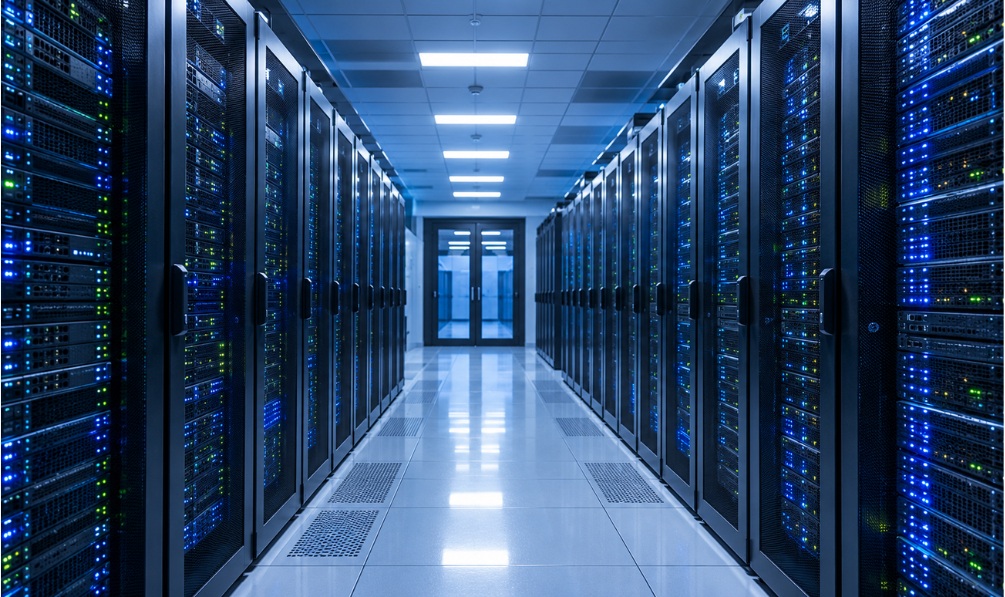
Data centers are physical facilities that house computer servers, storage devices, networking equipment, and supporting systems used to process, store, manage, and transfer digital information. They may occupy a small room, a dedicated building, or a large campus containing multiple buildings.
Businesses use data centers to run applications, maintain databases, host websites, store customer records, and support internal operations. Technology companies also operate large facilities that provide computing resources to customers around the world.
For example, when someone visits an online store, its application may run on servers inside a data center. Those servers process the request, retrieve product information, and send the resulting webpage to the visitor’s device.
A data center needs more than computing hardware to perform this work. It also requires reliable electricity, temperature control, network connections, physical protection, and systems that help reduce interruptions.
According to IBM’s explanation of data centers, modern facilities support both traditional business infrastructure and the shared computing resources used by cloud service providers.
How Do Data Centers Work?
A data center works by connecting computing, storage, and networking resources so that applications can respond to requests and handle information. Software manages these resources, while facility systems provide the electricity, cooling, and security needed for reliable operation.
The process usually follows these steps:
- A request arrives: A person opens a website, launches an application, or requests a file from an online service.
- The request travels through a network: Internet connections and routing equipment direct the request toward the appropriate service.
- A server processes the request: The application running on a server determines what information or action is needed.
- The system accesses data: The server may retrieve information from a database, storage system, or another connected service.
- A response returns: The server sends the requested page, file, result, or other information back to the user’s device.
- Monitoring systems check performance: Operators and automated tools monitor equipment, temperature, power, network activity, and potential faults.
Consider an online banking application. When a customer checks an account balance, the service must authenticate the request, retrieve the relevant account information, and display the result securely. Several software services and infrastructure components may work together to complete this process.
Not every request follows the same path. Large services may distribute work across multiple servers or facilities to handle heavy traffic, improve response times, and recover from certain failures.
What Is Inside a Data Center?
A data center combines IT equipment with building systems that keep the equipment operating safely. The exact design depends on the facility’s size, workload, reliability requirements, and business purpose.
1. Servers
Servers are computers designed to provide services to other computers or devices. They run applications, process calculations, manage databases, and respond to user requests.
Unlike an ordinary personal computer, a server is often designed for continuous operation, remote management, and workloads shared by many users. Facilities may contain hundreds or thousands of servers, although the number varies considerably.
2. Storage systems
Storage systems keep files, databases, backups, and application information. They may use hard disk drives, solid-state drives, or other storage technologies.
Businesses often maintain multiple copies of important information or separate backups to reduce the risk of permanent data loss. Storage design depends on how quickly information must be accessed, how much data needs to be retained, and how much protection is required.
3. Networking equipment
Switches, routers, network cables, and fiber-optic connections allow servers to communicate with each other and with external networks.
Firewalls and other network security controls help regulate traffic. In larger facilities, network design must handle substantial amounts of information while limiting congestion and supporting dependable connectivity.
4. Power systems
Servers require a steady supply of electricity. Data centers may use electrical distribution equipment, uninterruptible power supplies (UPS), batteries, and backup generators to manage power interruptions.
A UPS can provide short-term backup while a generator starts or during a brief outage. Actual protection depends on the facility’s design, equipment capacity, maintenance, and available fuel or stored energy.
5. Cooling and ventilation
Computing equipment produces heat as it operates. Without effective temperature management, excessive heat can affect performance, shorten equipment life, or cause shutdowns.
Data centers use different cooling methods, including controlled airflow, air-conditioning systems, and liquid cooling. The appropriate approach depends on equipment density, climate, energy availability, and workload requirements.
6. Security and monitoring
Physical security may include controlled entry, identity checks, surveillance, and restricted equipment areas. Cybersecurity measures help protect systems and data against unauthorized access.
Monitoring tools track equipment health, network performance, power consumption, and environmental conditions. Staff can investigate warnings and respond to faults before they develop into larger problems.
What Are the Main Types of Data Centers?
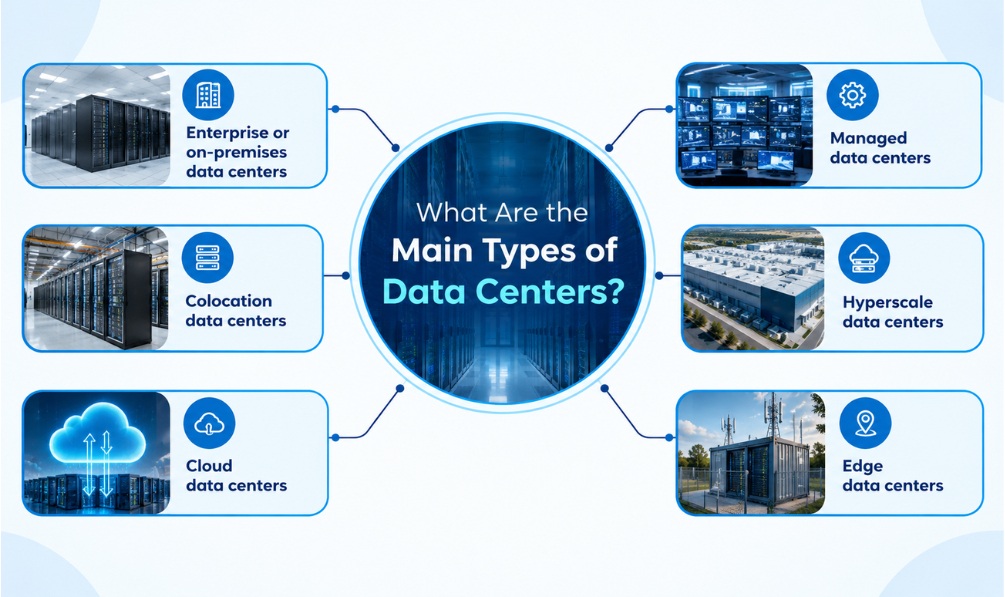
Data centers differ in ownership, management, location, and the way computing resources are provided. The following types cover common arrangements.
Enterprise or on-premises data centers
An enterprise data center is operated for an organization’s own computing needs. It may be located inside a company building or on a separate property.
This model gives the organization direct control over its infrastructure and configuration. However, the organization must plan for equipment purchases, maintenance, power, cooling, physical security, and technical staff.
Colocation data centers
A colocation facility allows businesses to place their own servers and networking equipment inside a third-party data center.
The provider typically supplies the building, electricity, cooling, physical security, and network connectivity according to the service agreement. The customer generally retains ownership or control of its equipment, although management responsibilities vary by contract.
Colocation can be useful for companies that need dedicated hardware but do not want to build and maintain an entire facility.
Cloud data centers
Cloud providers operate data center infrastructure and offer computing, storage, databases, and other services over a network. Customers can access resources without purchasing and maintaining all the underlying physical equipment themselves.
Cloud services can make it easier to increase or decrease computing capacity as requirements change. However, customers still need to configure access controls, protect their data, monitor usage, and choose suitable backup and recovery arrangements.
Managed data centers
In a managed arrangement, a third-party provider takes responsibility for specified infrastructure or operational tasks. Depending on the contract, this may include hardware management, maintenance, monitoring, backups, or technical support.
This option can help organizations that lack the staff or expertise to manage every part of their IT environment.
Hyperscale data centers
Hyperscale data centers are built to support very large computing workloads and substantial infrastructure capacity. They are commonly associated with major cloud providers, internet platforms, and organizations running large-scale data processing operations.
These facilities rely on extensive power, cooling, networking, and operational systems. Their architecture is designed to manage growth and coordinate large numbers of computing resources.
Edge data centers
Edge data centers place computing resources closer to the users or devices that need them. Reducing the distance data must travel can help lower latency, which is the delay between a request and its response.
They can support applications such as content delivery, industrial monitoring, connected devices, and other services where quick responses are important.
What Is the Difference Between a Data Center and the Cloud?
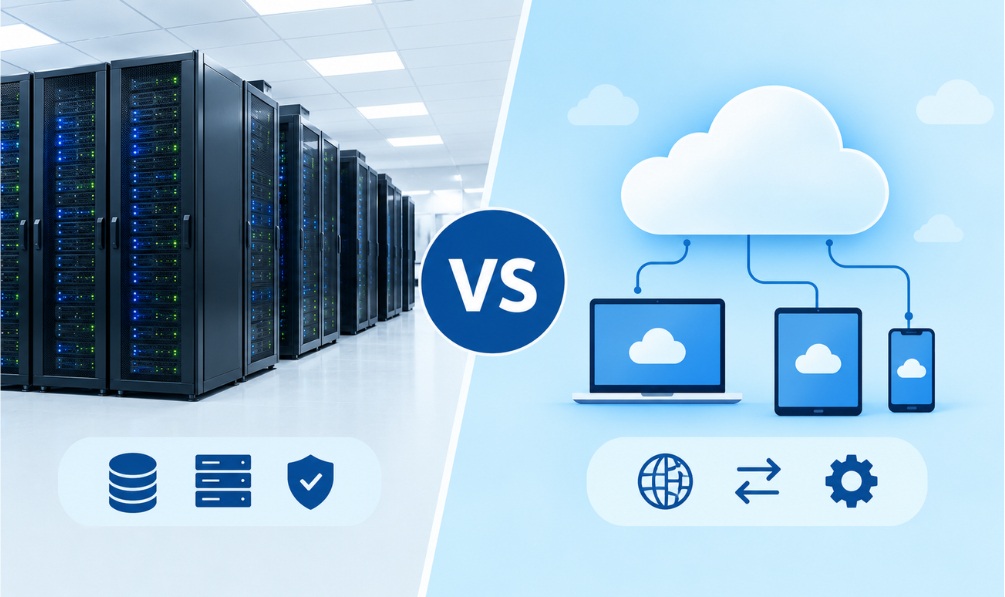
A data center is a physical facility containing computing infrastructure. Cloud computing is a way of providing computing resources and services on demand through a network.
The two concepts are connected, but they are not interchangeable. Cloud platforms rely on physical servers, storage, and networking equipment housed in data centers. A company can also operate a data center without offering cloud services.
For example, a business might own servers in its office and manage them directly. Another business might rent virtual servers from a cloud provider instead of purchasing physical machines. Both rely on computing infrastructure, but their ownership, management, and payment arrangements differ.
Cloud services commonly use virtualization, which allows software to divide physical computing resources into separate virtual environments. This helps providers allocate capacity among workloads without requiring a separate physical server for every application.
Organizations may also combine local infrastructure with public cloud services. This arrangement is often called a hybrid cloud approach.
Why Are Data Centers Important?
Data centers provide the infrastructure that many digital services need to operate. Their importance extends beyond technology companies.
They support websites and applications. Websites, online stores, content platforms, and business applications need computing resources to deliver pages and process requests.
They store and process information. Organizations use data centers for customer records, financial transactions, documents, databases, and analytics.
They enable cloud computing. Cloud providers depend on physical facilities to supply computing capacity, storage, and managed services.
They help businesses maintain operations. Suitable backup systems, redundant equipment, and recovery plans can help organizations respond to equipment failures or other disruptions.
They support artificial intelligence. AI workloads use computing resources to train models, run inference, and process large datasets. Some require specialized accelerators and higher power densities than conventional workloads.
They support communication and entertainment. Messaging services, video streaming, online gaming, and collaboration tools rely on infrastructure that stores content and processes user activity.
Data centers do not automatically make every service secure or uninterrupted. Reliability depends on the design, maintenance, software, network connections, and recovery arrangements used by both the provider and its customers.
Digital infrastructure also supports online entertainment platforms, as explained in this guide to Sony PlayStation’s platform business.
How Do Data Centers Stay Reliable and Secure?
Data center operators use several methods to reduce the likelihood and impact of failures. The right combination depends on the importance of the workload and the level of service the organization needs.
Redundancy and backup
Redundancy means providing additional equipment or capacity so that a failure does not necessarily stop the service. Examples include backup power systems, multiple network connections, and additional cooling equipment.
Backups serve a different purpose: they preserve information so it can be recovered after accidental deletion, corruption, or certain security incidents. A backup is most useful when it is protected, tested, and recoverable.
Disaster recovery
Disaster recovery plans describe how an organization will restore systems after a serious disruption. Some organizations maintain recovery infrastructure at a separate location so that essential services can be restored if their main site becomes unavailable.
A recovery plan should identify critical applications, recovery priorities, backup arrangements, and the time needed to restore operations.
Physical and digital protection
Facilities restrict access to equipment, while network and application controls help prevent unauthorized activity. Common measures include identity verification, access permissions, encryption, firewalls, software updates, and security monitoring.
No single measure prevents every threat. Effective protection requires layered controls, regular reviews, and clear responsibility for maintaining them.
Do Data Centers Use a Lot of Electricity?
Yes. Data centers consume electricity to run computing equipment and supporting systems such as cooling, lighting, and power distribution. Their consumption varies with facility size, server utilization, equipment efficiency, climate, and workload.
AI and other intensive computing tasks can increase demand for electricity and cooling capacity. This has made energy efficiency an important consideration when designing and operating new facilities.
Operators can improve efficiency through better airflow management, efficient servers, virtualization, workload scheduling, and appropriate cooling systems. Some also use renewable electricity or recover waste heat where local conditions and infrastructure make it practical.
Water use is another consideration. Certain cooling methods consume water directly, while other designs rely more heavily on electricity or different cooling technologies. Environmental effects therefore depend on the facility’s location, energy supply, cooling design, and resource management.
For a broader technical overview, Cisco’s guide to data centers explains modern infrastructure and the different ways organizations deploy computing resources.
What Is the Future of Data Centers?
Data center design continues to change as organizations adopt cloud services, automation, and AI applications. Several developments are shaping this evolution.
- AI-ready infrastructure: Facilities are adapting to demanding computing workloads that may require specialized processors, high-speed networking, and advanced cooling.
- More automation: Monitoring and management software can help operators identify faults, allocate resources, and improve operational efficiency.
- Energy-efficient designs: Operators are exploring better cooling, efficient equipment, and lower-carbon electricity sources.
- Distributed computing: Edge facilities and geographically distributed infrastructure can place resources closer to users and connected devices.
- Flexible infrastructure: Virtualization and software-defined management allow computing, storage, and networking capacity to be allocated more dynamically.
These developments do not mean every organization needs a large private facility. Depending on its requirements, a business may use a cloud platform, a colocation provider, an on-premises environment, or a combination of services.
Frequently Asked Questions
Are data centers the same as servers?
No. A server is a computer that runs applications or provides services. A data center is the facility that houses servers and the supporting infrastructure they need.
Who uses data centers?
Technology companies, banks, hospitals, retailers, universities, government agencies, and businesses of many sizes use data centers directly or through service providers.
Where are data centers located?
They can be found in many countries and regions. Operators consider factors such as electricity supply, network connectivity, physical security, climate, land availability, operating costs, and applicable regulations when selecting locations.
Can a small business use a data center?
Yes. A small business can rent space in a colocation facility, use managed hosting, or purchase cloud services. The best option depends on its budget, technical skills, security requirements, and expected workload.
Are data centers always available?
No. Equipment failures, network problems, power disruptions, software errors, and other incidents can cause downtime. Redundancy, monitoring, maintenance, backups, and recovery planning help reduce risks but cannot guarantee that every service will remain available at all times.
What is the difference between a data center and a server room?
A server room is generally a smaller space used to house computing equipment. A data center usually refers to a purpose-designed facility or environment with a broader range of infrastructure, capacity, and operational controls. The terms can overlap, especially in smaller organizations.
Conclusion
Data centers are the physical foundation behind many services people use every day. They combine servers, storage, networking, electricity, cooling, and security systems to run applications and manage digital information.
Understanding the different types of data centers also helps explain the choices available to organizations. Some operate their own facilities, while others use colocation, managed services, or cloud platforms. The right approach depends on cost, control, reliability, security, and workload requirements.
As cloud computing, AI, and connected technologies continue to develop, data centers will remain important to the digital economy. Their long-term value will depend not only on computing capacity but also on how reliably, securely, and efficiently that capacity is delivered.