
Ever scrolled past a video you loved, only to lose it forever in the endless feed? It happens to almost everyone. The good news is that TikTok keeps a record of what you watch. This guide explains TikTok Watch History, why it matters, and exactly how to find your watched videos in a few taps.
What Is TikTok Watch History?
TikTok Watch History is a built-in log of the videos you have viewed on the app. It stores each clip you watched recently, listed in order from newest to oldest.
This feature sits inside your account settings under Activity. It works like a browsing history on a web browser, but only for the videos you play on TikTok.
In short, TikTok Watch History is your personal record of viewed videos, making it easy to revisit content you scrolled past.
Why Is TikTok Watch History Important?
Losing a video you wanted to save is frustrating. The feed refreshes constantly, so a clip can vanish in seconds. Watch history solves that problem by keeping a searchable trail of your TikTok activity.
Here is why the feature matters:
- Recovers lost videos. You can find a clip you forgot to save or share.
- Tracks your habits. The list shows what you watch most, which helps you manage screen time.
- Supports privacy. You can review and clear your TikTok browsing history whenever you want.
This means your watch history acts as both a memory tool and a privacy control in one place.
Key Features and Benefits
TikTok Watch History does more than list old videos. It gives you real control over your TikTok viewed videos and your data.
Main features include:
- Chronological list. Videos appear from most recent to oldest.
- Quick access. The history opens in two taps from your profile.
- Deletion option. You can remove single videos or clear the whole list.
- Cross-session tracking. The log stays even after you close the app.
The benefits are practical:
- You save time when hunting for a specific clip.
- You keep your feed relevant by reviewing what you watch.
- You protect your privacy by clearing sensitive entries.
Together, these tools turn a simple list into a useful way to manage your watched videos on TikTok.
Step-by-Step Guide to Access Your TikTok Watch History
Finding your watch history takes less than a minute. Follow these steps on the latest version of the app.
- Open TikTok and log in to your account.
- Tap “Profile” in the bottom-right corner of the screen.
- Tap the menu icon (three lines) in the top-right corner.
- Select “Activity” from the settings menu.
- Tap “Watch history.” Your list of viewed videos appears here.
- Scroll through the list to find the video you want.
To watch a clip again, tap it. To remove entries, use the “Clear” button at the top of the history page.
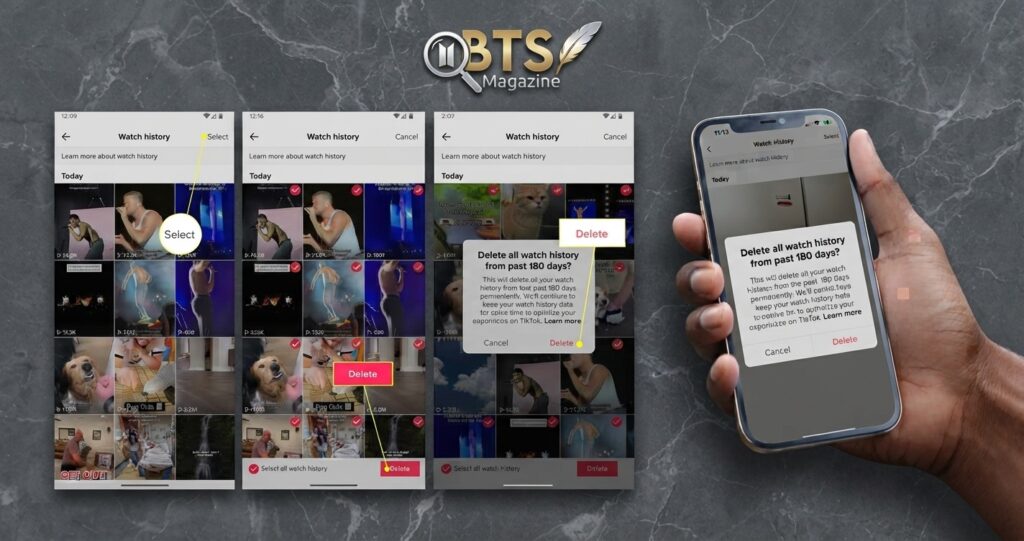
How to Delete Your Watch History
Sometimes you want a clean slate. TikTok lets you delete videos one by one or all at once.
- For one video: Tap “Select,” choose the clip, then tap “Delete.”
- For everything: Tap “Select,” then “Select all,” and confirm.
These steps give you full command over your TikTok activity in a few taps.
Common Mistakes to Avoid
Many users struggle to find their watch history, usually for simple reasons. Knowing these mistakes saves time and frustration.
- Running an outdated app. The watch history feature needs a recent TikTok version. Update the app first.
- Looking in the wrong menu. Watch history lives under “Activity,” not “Privacy” or “Content preferences.”
- Confusing history with liked videos. Your liked list and your watch history are separate features.
- Expecting old records. TikTok stores a limited window of viewed videos, not your entire history.
- Forgetting to log in. Watch history only tracks activity tied to your account.
Avoiding these errors means you reach your watched videos faster and with less guesswork.
Expert Tips for Managing TikTok Watch History
A few smart habits make the feature far more useful. These tips come from steady, everyday use of the app.
- Save before you scroll. If a video grabs you, bookmark it right away instead of relying on history later.
- Clear history regularly. Deleting old entries keeps the list short and easy to search.
- Update the app monthly. New versions add features and fix bugs that hide your history.
- Use search inside history. On supported versions, the search bar helps you find a clip by keyword.
- Review your habits. Check the list to see how much time you spend on TikTok activity each week.
Applied together, these habits keep your watch history clean, current, and easy to use.
FAQs About TikTok Watch History
Can I see my TikTok watch history?
Yes. Open your profile, tap the menu icon, select “Activity,” then tap “Watch history.” Your list of viewed videos appears in order from newest to oldest. You can replay any clip or delete entries. The feature requires a recent version of the TikTok app.
How far back does TikTok watch history go?
TikTok stores a limited window of your watched videos, not your full lifetime history. The exact range varies by app version and account activity. Most users see recent videos from the past several months. Older entries drop off automatically as new ones are added.
Why can’t I find my watch history on TikTok?
The most common reason is an outdated app. Update TikTok from your app store, then look under “Activity” in the settings menu. Watch history is not stored under “Privacy” or “Liked videos,” so check the correct section before assuming the feature is missing.
Can other people see my TikTok watch history?
No. Your TikTok watch history is private and visible only to you when logged into your account. Other users, including friends and followers, cannot view your list of watched videos. Liked videos may appear publicly, but that is a separate setting you control.
How do I delete my TikTok watch history?
Open “Watch history” under “Activity,” then tap “Select.” Choose individual videos or tap “Select all” to remove everything. Confirm your choice to clear the entries. Deleting your history removes videos from the list but does not affect your account or liked videos.
Does clearing watch history affect my For You feed?
Clearing your history has little direct effect on your For You feed. TikTok builds recommendations from many signals, including likes, follows, and watch time. Deleting the visible history list does not erase all the data behind your suggestions, so your feed stays mostly the same.
Conclusion
TikTok Watch History gives you a simple, reliable way to find videos you already watched. It stores your viewed videos in order, lets you replay them, and helps you clear your browsing history when needed.
To recap the essentials:
- Access it through Profile → Menu → Activity → Watch history.
- Manage it by replaying, selecting, or deleting videos.
- Protect it by clearing entries and keeping the app updated.
Open TikTok now, follow the steps above, and take control of your watched videos in under a minute.
Further Reading: TikTok – Wikipedia
Read also: 7 Royal Ascot Results That Stunned the Racing World