

Skindex is the name that pops up first whenever someone asks how to change their Minecraft character. If you’ve ever wondered why your friends show up as anime heroes, cartoon animals, or custom superheroes while you’re stuck as plain old Steve, this is where they got their look. The Skindex has been the go-to spot for custom Minecraft skins for over a decade.
- What Is The Skindex, Really?
- A Quick History of Skindex
- Is Skindex Safe and Legit?
- How to Browse and Download Skins on Skindex
- Path One: You Just Want a Skin
- Path Two: You Want to Tweak an Existing Skin
- Path Three: You Want Something Totally Original
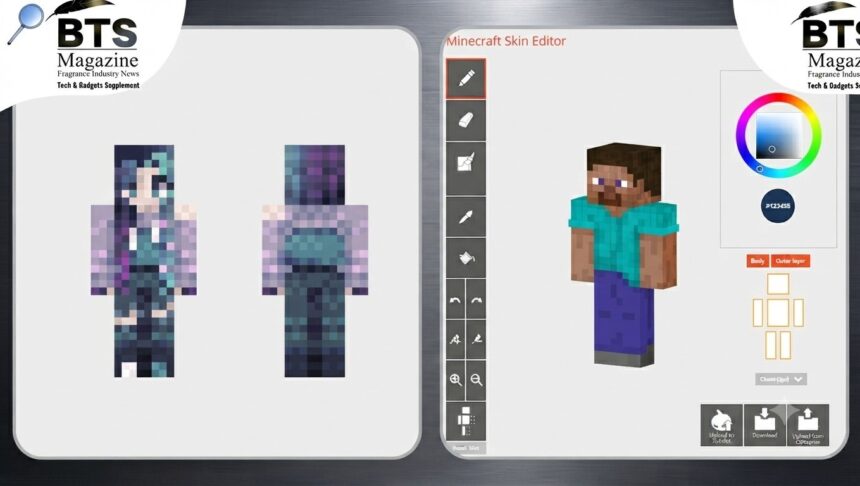
- The Built-In Skin Editor Explained
- How to Apply Skindex Skins in Your Game
- Tips for Finding the Best Skins on Skindex
- Why Skindex Stays So Popular
- Skindex vs. Other Skin Sites
- Final Thoughts on Using Skindex
Here’s the thing — a lot of people use it without really knowing what it is or whether it’s safe. So let’s clear all that up. In this guide, we’ll cover what the site actually does, its history, safety, how to browse and download skins, the built-in editor, and how to apply your new look in both Java and Bedrock editions.
What Is The Skindex, Really?
The Skindex (found at minecraftskins.com) is a community-driven website built around one simple thing: Minecraft player skins. It’s a giant, searchable gallery where players browse, download, upload, and share custom skins.
To be honest, that focus is why it works so well. It doesn’t try to be a mod hub or a server list. It just does skins, and it does them at scale.
A Fan Site, Not an Official Product
This part matters. The Skindex is not an official Minecraft product. It has no endorsement from Mojang or Microsoft, and the site says so plainly.
What’s interesting is that this transparency is actually a good sign. When a fan-built platform is upfront about what it is, that’s the opposite of a red flag.
A Quick History of Skindex
The site has been running since 2010, which makes it one of the oldest skin communities still standing. That’s a long time in internet years.
Over those years, thousands of user-submitted skins have piled up. The result is a huge library filtered by category, style, and popularity signals like view counts and download counts.
Is Skindex Safe and Legit?
Short answer: yes, when you use it normally. Longer answer needs a little detail, because “safe” means different things to different people.
What Makes It Trustworthy
Skins on the site are just PNG image files. You’re not downloading an executable or installing sketchy software from the third-party site itself.
Account creation is optional, too. You only need an account if you want to upload your own creations or save favorites. Browsing and downloading work without one.
What to Watch For
Like any free, ad-supported site, you’ll see display advertising. That’s normal. Just avoid clicking pop-ups that scream about “system alerts” or forced app installs — those aren’t the site itself.
Any platform hosting millions of user uploads has to moderate constantly, so nothing is guaranteed. Still, structurally it behaves like a normal, above-board fan community.
How to Browse and Download Skins on Skindex
Using the site is refreshingly simple. There are really three paths, depending on what you want.
Path One: You Just Want a Skin
Browse by category — human characters, animals, cartoon styles, and pop-culture-inspired designs. Preview the skin on a rotating 3D model, then download the PNG file directly. No account needed.
Path Two: You Want to Tweak an Existing Skin
Open the built-in editor, load an existing skin from the library, and change it pixel by pixel. Great for small edits.
Path Three: You Want Something Totally Original
Start from a blank template and build your skin layer by layer. The grid system keeps everything lined up with the Minecraft character model.
The browsing experience is genuinely fast. Filtering by tag and time period — latest, top-rated, most downloaded — surfaces good results quickly without a cluttered mess.
The Built-In Skin Editor Explained
This is where Skindex really earns its reputation. The editor is free, browser-based, and forgiving enough for people who aren’t pixel artists.
Understanding Layers
The editor separates the base skin layer from the overlay layer — the semi-transparent “hat,” “jacket,” and “sleeve” layers Minecraft uses for hair or clothing detail.
That layer separation trips people up. Paint on the wrong layer and your detail either disappears in-game or renders as a weird floating shell around your character.
Pixel Tools You’ll Use
The tool set covers the basics well: a brush, an eraser, and a color picker with hex code input for exact color matching. Pose previews let you check how the skin reads from different angles before you commit.
Why the Grid Toggle Matters
There’s a grid toggle, and honestly, it’s essential. Without it, it’s easy to misjudge where a body part boundary falls on the flattened skin template.
For quick edits — recoloring, fixing a hairstyle, patching a texture seam — the editor is excellent. For elaborate pixel art from scratch, dedicated software like Aseprite gives you tighter zoom precision and better undo history.
How to Apply Skindex Skins in Your Game
This step confuses more people than you’d expect, so let’s spell it out. The Skindex is where you find and design the image file. Applying it happens somewhere else.
Java Edition
On Java Edition, log into your Microsoft/Minecraft account and upload the skin PNG through the official minecraft.net profile page. The file comes from The Skindex, but the actual application happens on Mojang’s own site.
Bedrock Edition
On Bedrock Edition (Windows, console, mobile), you import the downloaded file through the in-game Skins menu inside the game client.
One Important Warning
No third-party skin site — Skindex included — can change your skin for you automatically. If anything claims it can push a skin directly onto your account without you uploading it through the official client, be skeptical.
Tips for Finding the Best Skins on Skindex
The library is massive, which is great until you’re scrolling forever. A few habits make it easier.
- Sort by “Most Voted” to skip the low-effort uploads.
- Use specific tags like a character name or theme instead of broad terms.
- Check the 3D preview before downloading — flat thumbnails can hide odd texture seams.
- Save favorites with a free account so you don’t lose a skin you liked.
Editing Beats Starting From Scratch
Here’s a small trick: load a skin you almost like into the editor and adjust it. Changing a hair color or shirt is way faster than building free Minecraft skins from a blank grid.
Why Skindex Stays So Popular
The site has stuck around for a reason. It’s free, it’s fast, and it does one job extremely well.
The community keeps it alive too. New pixel art uploads land daily, so the library never feels stale. That steady stream of custom skins is hard for newer sites to match.
And because it’s browser-based, there’s nothing to install. You browse, download the PNG file, and apply it — done.
Skindex vs. Other Skin Sites
Plenty of alternatives exist, but few have the same combination of size and history. Some competitors offer slicker editors or 3D modeling tools, and those can win for advanced creators.
For everyday players, though, minecraftskins.com hits the sweet spot. Big library, simple downloads, and an editor that’s good enough for most edits without any cost.
Final Thoughts on Using Skindex
Let’s wrap it up. The Skindex is a long-running, community-built home for Minecraft skins that’s free, easy, and safe to use with basic common sense. Browse the gallery, download a PNG, or design your own in the editor — then apply it through the official Java or Bedrock method.
Your next step is simple: pick a skin you like, tweak it in the editor, and upload it through your official account. If you want the bigger picture on where skins fit into the game overall, the Minecraft Wikipedia page is a solid read on how the whole sandbox world came to be.
Continue reading: Aramco Championship 2026: Everything You Need to Know About This Historic Women’s Golf Event