
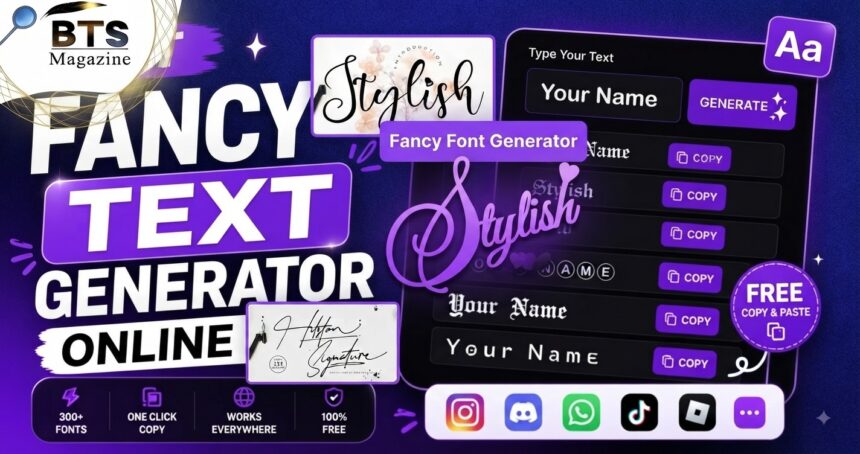
Fancy Text Generator tools make it easy to turn ordinary words into stylish, eye-catching text that you can copy and paste almost anywhere. You type something simple, choose a style you like, and copy the converted version for your social media profile, username, caption, gaming name, or message.
- What Is a Fancy Text Generator?
- How Fancy Text Actually Works
- Why People Use Fancy Text
- Fancy Text for Social Media Profiles
- Fancy Text for Gaming Names
- Fancy Text for WhatsApp and Messages
- How to Use a Fancy Text Generator
- Step 1: Enter Your Normal Text
- Step 2: Browse the Available Styles
- Step 3: Copy Your Favorite Version
- Step 4: Paste and Test It
- Popular Types of Fancy Text Styles
- Bold and Italic-Looking Text
- Cursive and Script Text
- Circled and Boxed Letters
- Symbols and Decorative Characters
- Is Fancy Text the Same as a Font Generator?
- Is Fancy Text Safe to Copy and Paste?
- Can Fancy Text Affect Accessibility?
- Should You Use Fancy Text for SEO?
- Tips for Choosing the Best Fancy Text Generator
- Common Mistakes to Avoid
- When Plain Text Is the Better Choice
- Final Thoughts on Using Stylish Text
Here’s the thing: most people do not want to download a new font just to make one username or Instagram bio look different. They want something quick. That is exactly where these generators become useful.
You might enter a normal word such as Hello and see versions that look bold, italic, cursive, circled, decorative, or unusual. Some tools also add symbols, borders, stars, hearts, and other characters around the text.
What Is a Fancy Text Generator?
A Fancy Text Generator is an online tool that converts regular letters and numbers into decorative characters or styled alternatives.
In many cases, what looks like a completely different font is actually a collection of Unicode characters rather than a traditional font installed on your device. Unicode includes a very large range of characters and symbols used by computers and digital platforms.
This distinction matters because Unicode characters can often be copied like normal text. You are not necessarily creating an image or uploading a font file.
How Fancy Text Actually Works
The process looks almost instant from the user’s side.
You type normal text into a box. The generator compares each character with available styled or decorative characters and displays different versions underneath.
For example, a normal letter may be replaced with a mathematical bold, italic, script, or double-struck Unicode character. Unicode’s Mathematical Alphanumeric Symbols block contains styled forms of Latin and Greek letters as well as digits.
That is one reason these characters can look like special fonts even though they remain text.
Unicode Characters vs Regular Fonts
A normal font changes the visual appearance of a character through typography. Arial and Times New Roman, for example, can display the same underlying letter differently.
Unicode-based fancy text works differently. It may replace the original character with another encoded character that has a distinct appearance.
This is why copying decorative text from one website and pasting it somewhere else can sometimes preserve its unusual appearance.
However, not every application, browser, device, or font supports every Unicode character equally.
Why Some Styles Work Better Than Others
Simple styles are usually easier to read.
Bold-looking letters, clean script characters, circled letters, and a few symbols can add personality without making the text confusing.
Very complicated combinations may not display properly everywhere. Some characters can appear as empty boxes, question marks, or inconsistent shapes when the receiving system lacks suitable character support.
To be honest, the fanciest option is not always the best option.
Why People Use Fancy Text
Decorative text is popular because it takes only a few seconds to create.
You do not need graphic design experience. You do not have to install editing software. In many cases, you simply type, copy, and paste.
A Fancy Text Generator can be especially useful when a platform gives you a plain text field but you still want a small amount of visual personality.
It can make a short name, heading, or phrase stand out from the surrounding text.
Fancy Text for Social Media Profiles
Social media is one of the most common places where people experiment with stylish characters.
A short profile bio can feel more personal when certain words are highlighted. Someone might use a decorative version of their name while keeping important information in normal text.
That balance is important.
If your entire profile is filled with difficult decorative characters, visitors may struggle to understand what it says. Use stylish text as an accent rather than treating every sentence like a design experiment.
Instagram Bios and Captions
Instagram users often want names, short quotes, category labels, or profile headings to look different.
A simple stylish word can help separate parts of a bio. Decorative characters can also add personality to short captions.
Still, readability should come first. Your location, profession, business details, website information, and calls to action are usually better written clearly.
Fancy text should support the message rather than hide it.
TikTok Profiles and Usernames
TikTok profiles are another place where decorative text may be useful.
Creators can experiment with stylish names, short bio phrases, and symbols that match the personality of their content.
Before settling on a style, paste it into the actual platform and check how it looks. A preview inside a text generator does not guarantee that every platform will display every character in exactly the same way.
Fancy Text for Gaming Names
Gamers often use creative usernames to build a recognizable identity.
A Fancy Text Generator can provide alternative versions of a nickname using unusual characters, symbols, or letter styles. This can be useful when you want a name that looks different from ordinary text.
There is one catch.
Games have their own username rules. Some allow a wide range of Unicode characters, while others limit names to standard letters, numbers, and a small selection of symbols.
Always test the final version before deciding that a gaming name will work.
Stylish Text for Discord and Communities
Discord servers and other online communities can also inspire people to experiment with decorative text.
You might use it for a display name, a short status, or an informal heading where supported.
Try not to make functional information harder to read. Rules, instructions, dates, warnings, and important announcements should normally remain clear and accessible.
Creative text works best where decoration is actually useful.
Fancy Text for WhatsApp and Messages
Sometimes you just want a message to feel more fun.
You might use decorative characters for a birthday greeting, nickname, short phrase, or friendly message. Instead of sending a plain “Happy Birthday,” you can create a more playful version and paste it into the conversation.
What’s interesting is that this does not necessarily require sending an image. When supported, the characters can remain selectable and copyable text.
That makes the process fast and convenient.
How to Use a Fancy Text Generator
Using a Fancy Text Generator is generally straightforward.
Step 1: Enter Your Normal Text
Start by typing your word, username, caption, or phrase into the generator’s input box.
Keep the original text simple at first. It makes comparing the generated versions much easier.
Step 2: Browse the Available Styles
The tool may display several variations immediately.
You could see bold-looking text, italic characters, script styles, enclosed letters, decorative symbols, or other variations.
Look for a style that fits the purpose instead of simply choosing the most unusual one.
Step 3: Copy Your Favorite Version
Once you find something you like, copy it.
Some tools include a dedicated copy button. With others, you can select the text manually and use your device’s standard copy function.
Step 4: Paste and Test It
Paste the result into your intended website or app.
Check whether every character appears correctly. You should also view it on a phone if the text will mainly be seen by mobile users.
If a style looks broken or difficult to read, return to the generator and choose a simpler version.
Popular Types of Fancy Text Styles
There is no single fancy text style that works for every situation.
Different generators offer different choices, but several broad categories are common.
Bold and Italic-Looking Text
Bold and italic-looking Unicode characters are useful when you want something noticeable without making it overly decorative.
They can work well for short names and headings.
Some styled mathematical alphabets are encoded as separate Unicode characters, which helps explain why certain bold or script-like characters can be copied as text.
Cursive and Script Text
Script-style characters can give names and short phrases a softer or more elegant appearance.
They are often chosen for bios, aesthetic usernames, greetings, and informal captions.
Use them carefully with longer sentences. Decorative script can quickly become difficult to read when there is too much of it.
Circled and Boxed Letters
Enclosed letters create a completely different visual style.
They can work well for initials, labels, small headings, or playful usernames. Unicode includes blocks containing enclosed alphanumeric and letterlike symbols, among many other categories of characters.
Again, compatibility can vary depending on the device and software.
Symbols and Decorative Characters
Some generators go beyond letter conversion.
They may place stars, arrows, hearts, brackets, lines, or other symbols around your words.
Unicode includes many symbol ranges, covering everything from arrows and geometric shapes to miscellaneous symbols.
A few carefully chosen symbols can make a name look interesting. Too many can turn it into visual noise.
Is Fancy Text the Same as a Font Generator?
Not always.
The phrase “font generator” is commonly used for tools that produce fancy copy-and-paste text, but technically the output may involve Unicode characters rather than a newly generated font.
A Unicode font maps glyphs to characters defined by the Unicode Standard.
This difference explains why you may be able to paste a fancy-looking word directly into another app without downloading or installing anything.
Is Fancy Text Safe to Copy and Paste?
Normal Unicode text itself is a standard part of digital text processing, but you should still be careful about where you obtain generated content.
Use reputable websites and avoid downloading unnecessary applications, browser extensions, or files just to produce simple decorative text.
You also should not copy characters blindly when they will be used in important information.
Passwords, email addresses, web addresses, account recovery information, formal documents, and contact details are better kept in straightforward characters.
Can Fancy Text Affect Accessibility?
Yes, this is an important point.
Decorative Unicode text may not always be interpreted by screen readers in the same way as ordinary words. That can create accessibility problems for people who rely on assistive technology.
For that reason, avoid replacing every sentence with decorative characters.
Keep essential information in plain text. Use unusual styles mainly for short decorative elements where losing the styling would not prevent someone from understanding the main content.
Should You Use Fancy Text for SEO?
Fancy characters should be used carefully on web pages intended for search traffic.
Your main page title, important headings, navigation labels, product information, and target keywords should generally be easy for both humans and software to process.
Do not replace every instance of an important keyword with visually similar Unicode characters just because it looks different.
For SEO content, clarity is more valuable than decoration.
A Fancy Text Generator is better suited to usernames, social posts, visual accents, and informal text than to the core written information of an important web page.
Tips for Choosing the Best Fancy Text Generator
A useful generator should make the process simple rather than complicated.
Look for a tool that lets you enter text quickly, shows several readable variations, and makes copying straightforward. It should also work properly on mobile devices because many people create social media content directly from their phones.
Avoid tools that force unnecessary downloads for a basic copy-and-paste task.
It also helps when the original input stays visible, allowing you to compare normal and decorative versions before making a choice.
Common Mistakes to Avoid
The biggest mistake is overusing fancy characters.
One decorative word can stand out. An entire paragraph written with difficult symbols may simply become annoying to read.
Another common mistake is assuming every style will work everywhere. A character that displays correctly in your browser might look different on another operating system, application, or device.
Finally, do not sacrifice meaning for appearance. If your audience cannot quickly understand your text, the style is working against you.
When Plain Text Is the Better Choice
Fancy text is not necessary for everything.
Use regular characters for addresses, phone numbers, email addresses, important instructions, legal information, safety information, accessibility-focused content, and anything people may need to search or type manually.
Plain text is also usually better for long articles.
Decorative text works best in small doses. Think of it like adding a small design element rather than completely changing the way you communicate.
Final Thoughts on Using Stylish Text
A Fancy Text Generator is a simple way to give usernames, bios, short captions, gaming names, and messages a different look without spending time designing graphics. The best approach is to choose readable styles, test them on the platform where they will appear, and keep important information in normal text.
If you are curious about why many copy-and-paste styles can exist as actual characters, the subject is closely connected with Unicode on Wikipedia. Unicode provides standardized character encoding across digital systems and includes many letter, symbol, and styled-character ranges used in modern text. Understanding that basic idea makes it much easier to see what a fancy text tool is really doing behind the scenes.